private void button1_Click(object sender, EventArgs e)
{
this.Text = "父表單";
//設定為MDI Form(父表單)
this.IsMdiContainer = true;
Form2 f = new Form2();
CreateChildForm(f);
}
private void CreateChildForm(Form f)
{
f.Text = "子表單";
//設定為MDI Form(子表單)
f.MdiParent = this;
//最大化
f.WindowState = FormWindowState.Maximized;
//顯示子表單
f.Show();
}
執行畫面如下:
2014年5月16日 星期五
2014年4月27日 星期日
[C#] LINQ Where In 的寫法
using System;
using System.Collections.Generic;
using System.ComponentModel;
using System.Data;
using System.Drawing;
using System.Linq;
using System.Text;
using System.Threading.Tasks;
using System.Windows.Forms;
namespace WindowsFormsApplication1
{
public partial class Form1 : Form
{
public Form1()
{
InitializeComponent();
}
private List<string> str = new List<string>();
private void button1_Click(object sender, EventArgs e)
{
string[] t1 = { "Abel", "Abner") };
str.Add('Abe");;
str.Add("Abel");
str.Add("Abner");
str.Add("Abraham");
var query = from s in str where t1.Contains(s) select s;
foreach (string s in query)
{
MessageBox.Show(s);
}
}
}
}
有興趣的朋友可以試試看喔!!
using System.Collections.Generic;
using System.ComponentModel;
using System.Data;
using System.Drawing;
using System.Linq;
using System.Text;
using System.Threading.Tasks;
using System.Windows.Forms;
namespace WindowsFormsApplication1
{
public partial class Form1 : Form
{
public Form1()
{
InitializeComponent();
}
private List<string> str = new List<string>();
private void button1_Click(object sender, EventArgs e)
{
string[] t1 = { "Abel", "Abner") };
str.Add('Abe");;
str.Add("Abel");
str.Add("Abner");
str.Add("Abraham");
var query = from s in str where t1.Contains(s) select s;
foreach (string s in query)
{
MessageBox.Show(s);
}
}
}
}
有興趣的朋友可以試試看喔!!
2014年1月19日 星期日
[Web] IIS架設簡易流程
1.
安裝 .NET Framework 4.X版本以上
2. 開啟命令字元提示
輸入:
cd C:\WINNT\Microsoft.NET\Framework\v4.0.XXXXX
執行aspnet_regiis –i
3.
控制台\所有控制台項目\系統管理工具
開啟IIS
設定:
1.確認 .NET FrameWork 是否為 4.0版本
2.作業系統為64位元(X64) 假設DLL檔為32位元(X86)
設定為:
2013年12月21日 星期六
[C#] 透過繼承抽象類別(泛型)並實作
public abstract class Shape<S,T>
{
T _Result=default(T);
S _ShapeName = default(S);
//Calculate Shape Area
public virtual T Area(T Par1, T Par2) { return _Result; }
//Calculate Shape Volume
public virtual T Volume(T Length, T Width, T Height) { return _Result; }
//Calculate Triangle Volume
public virtual T Volume(T Bottom, T Height) { return _Result; }
//Show Is ShapeName
public virtual S ShapeName() { return _ShapeName; }
}
public class Square : Shape<string,double>
{
public override double Area(double Length, double Width)
{
return Length * Width;
}
public override double Volume(double Length, double Width, double Height)
{
return Length * Width * Height;
}
public override string ShapeName()
{
return "Shape";
}
}
public class Triangle : Shape<string, int>
{
public override int Area(int Bottom, int Height)
{
return Bottom * Height / 2;
}
public override int Volume(int Bottom, int Height)
{
return Bottom * Height / 2*Height;
}
public override string ShapeName()
{
return "Triangle";
}
}
private void btnAction_Click(object sender, EventArgs e)
{
Shape<string,int> ishap = new Triangle();
MessageBox.Show(ishap.ShapeName() + "面積 : " + ishap.Area(8, 9) + "\n" + ishap.ShapeName() + "體積 : " + ishap.Volume(8, 9));
}
執行結果:
{
T _Result=default(T);
S _ShapeName = default(S);
//Calculate Shape Area
public virtual T Area(T Par1, T Par2) { return _Result; }
//Calculate Shape Volume
public virtual T Volume(T Length, T Width, T Height) { return _Result; }
//Calculate Triangle Volume
public virtual T Volume(T Bottom, T Height) { return _Result; }
//Show Is ShapeName
public virtual S ShapeName() { return _ShapeName; }
}
public class Square : Shape<string,double>
{
public override double Area(double Length, double Width)
{
return Length * Width;
}
public override double Volume(double Length, double Width, double Height)
{
return Length * Width * Height;
}
public override string ShapeName()
{
return "Shape";
}
}
public class Triangle : Shape<string, int>
{
public override int Area(int Bottom, int Height)
{
return Bottom * Height / 2;
}
public override int Volume(int Bottom, int Height)
{
return Bottom * Height / 2*Height;
}
public override string ShapeName()
{
return "Triangle";
}
}
private void btnAction_Click(object sender, EventArgs e)
{
Shape<string,int> ishap = new Triangle();
MessageBox.Show(ishap.ShapeName() + "面積 : " + ishap.Area(8, 9) + "\n" + ishap.ShapeName() + "體積 : " + ishap.Volume(8, 9));
}
執行結果:
2013年12月17日 星期二
[C#] 利用LIQN 實作 兩個DataTable 差集
private DataTable _dt1 ;
private DataTable _dt2;
public Form1()
{
InitializeComponent();
_dt1 = new DataTable();
_dt2 = new DataTable();
}
private void Form1_Load(object sender, EventArgs e)
{
_dt1.Columns.Add(new DataColumn("Root", typeof(string)));
DataRow r;
for (int i = 1; i < 6; i++)
{
r = _dt1.NewRow();
r["Root"] = i;
_dt1.Rows.Add(r);
}
_dt2.Columns.Add(new DataColumn("Root", typeof(string)));
for (int i = 1; i < 11; i++)
{
r = _dt2.NewRow();
r["Root"] = i;
_dt2.Rows.Add(r);
}
}
private void btnAction_Click(object sender, EventArgs e)
{
IEnumerable<DataRow> Query1 = _dt1.AsEnumerable();
IEnumerable<DataRow> Query2 = _dt2.AsEnumerable();
DataTable dt = Query2.Except(Query1, DataRowComparer.Default).CopyToDataTable();
dataGridView1.DataSource = dt;
}
結果如下:
private DataTable _dt2;
public Form1()
{
InitializeComponent();
_dt1 = new DataTable();
_dt2 = new DataTable();
}
private void Form1_Load(object sender, EventArgs e)
{
_dt1.Columns.Add(new DataColumn("Root", typeof(string)));
DataRow r;
for (int i = 1; i < 6; i++)
{
r = _dt1.NewRow();
r["Root"] = i;
_dt1.Rows.Add(r);
}
_dt2.Columns.Add(new DataColumn("Root", typeof(string)));
for (int i = 1; i < 11; i++)
{
r = _dt2.NewRow();
r["Root"] = i;
_dt2.Rows.Add(r);
}
}
private void btnAction_Click(object sender, EventArgs e)
{
IEnumerable<DataRow> Query1 = _dt1.AsEnumerable();
IEnumerable<DataRow> Query2 = _dt2.AsEnumerable();
DataTable dt = Query2.Except(Query1, DataRowComparer.Default).CopyToDataTable();
dataGridView1.DataSource = dt;
}
結果如下:
2013年12月16日 星期一
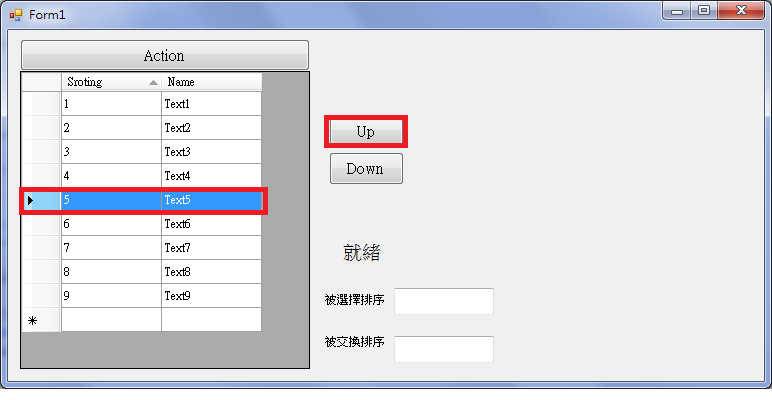
[C#]利用BindingSource實現DataGridView 排序
private DataTable _dt;
private BindingSource _BindingSource;
public Form1()
{
InitializeComponent();
_dt = new DataTable();
_BindingSource = new BindingSource();
}
private void Form1_Load(object sender, EventArgs e)
{
_dt.TableName = "TestDataTable";
_dt.Columns.Add(new DataColumn("Sroting", typeof(int)));
_dt.Columns.Add(new DataColumn("Name", typeof(string)));
DataRow dr;
for (int i = 1; i < 10; i++)
{
dr = _dt.NewRow();
dr["Sroting"] = i;
dr["Name"] = "Text" + i.ToString();
_dt.Rows.Add(dr);
}
}
private void button1_Click(object sender, EventArgs e)
{
_BindingSource.DataSource = _dt;
_BindingSource.Sort = "Sroting Asc";
dataGridView1.DataSource = null;
dataGridView1.DataSource = _BindingSource;
}
private void btnUpSorting_Click(object sender, EventArgs e)
{
if (_BindingSource.Position == 0) {
return;
}
((DataRowView)_BindingSource[_BindingSource.Position - 1]).Row.BeginEdit();
((DataRowView)_BindingSource[_BindingSource.Position - 1]).Row["Sroting"] = (int)((DataRowView)_BindingSource[_BindingSource.Position - 1]).Row["Sroting"] + 1;
((DataRowView)_BindingSource[_BindingSource.Position - 1]).Row.EndEdit();
((DataRowView)_BindingSource[_BindingSource.Position]).Row.BeginEdit();
((DataRowView)_BindingSource[_BindingSource.Position]).Row["Sroting"] = (int)((DataRowView)_BindingSource[_BindingSource.Position]).Row["Sroting"] - 1;
((DataRowView)_BindingSource[_BindingSource.Position]).Row.EndEdit();
}
private void btnDownSorting_Click(object sender, EventArgs e)
{
if (_BindingSource.Position == (_dt.Rows.Count-1))
{
return;
}
((DataRowView)_BindingSource[_BindingSource.Position + 1]).Row.BeginEdit();
((DataRowView)_BindingSource[_BindingSource.Position + 1]).Row["Sroting"] = (int)((DataRowView)_BindingSource[_BindingSource.Position + 1]).Row["Sroting"] - 1;
((DataRowView)_BindingSource[_BindingSource.Position + 1]).Row.EndEdit();
((DataRowView)_BindingSource[_BindingSource.Position]).Row.BeginEdit();
((DataRowView)_BindingSource[_BindingSource.Position]).Row["Sroting"] = (int)((DataRowView)_BindingSource[_BindingSource.Position]).Row["Sroting"] + 1;
((DataRowView)_BindingSource[_BindingSource.Position]).Row.EndEdit();
}
執行結果:
private BindingSource _BindingSource;
public Form1()
{
InitializeComponent();
_dt = new DataTable();
_BindingSource = new BindingSource();
}
private void Form1_Load(object sender, EventArgs e)
{
_dt.TableName = "TestDataTable";
_dt.Columns.Add(new DataColumn("Sroting", typeof(int)));
_dt.Columns.Add(new DataColumn("Name", typeof(string)));
DataRow dr;
for (int i = 1; i < 10; i++)
{
dr = _dt.NewRow();
dr["Sroting"] = i;
dr["Name"] = "Text" + i.ToString();
_dt.Rows.Add(dr);
}
}
private void button1_Click(object sender, EventArgs e)
{
_BindingSource.DataSource = _dt;
_BindingSource.Sort = "Sroting Asc";
dataGridView1.DataSource = null;
dataGridView1.DataSource = _BindingSource;
}
private void btnUpSorting_Click(object sender, EventArgs e)
{
if (_BindingSource.Position == 0) {
return;
}
((DataRowView)_BindingSource[_BindingSource.Position - 1]).Row.BeginEdit();
((DataRowView)_BindingSource[_BindingSource.Position - 1]).Row["Sroting"] = (int)((DataRowView)_BindingSource[_BindingSource.Position - 1]).Row["Sroting"] + 1;
((DataRowView)_BindingSource[_BindingSource.Position - 1]).Row.EndEdit();
((DataRowView)_BindingSource[_BindingSource.Position]).Row.BeginEdit();
((DataRowView)_BindingSource[_BindingSource.Position]).Row["Sroting"] = (int)((DataRowView)_BindingSource[_BindingSource.Position]).Row["Sroting"] - 1;
((DataRowView)_BindingSource[_BindingSource.Position]).Row.EndEdit();
}
private void btnDownSorting_Click(object sender, EventArgs e)
{
if (_BindingSource.Position == (_dt.Rows.Count-1))
{
return;
}
((DataRowView)_BindingSource[_BindingSource.Position + 1]).Row.BeginEdit();
((DataRowView)_BindingSource[_BindingSource.Position + 1]).Row["Sroting"] = (int)((DataRowView)_BindingSource[_BindingSource.Position + 1]).Row["Sroting"] - 1;
((DataRowView)_BindingSource[_BindingSource.Position + 1]).Row.EndEdit();
((DataRowView)_BindingSource[_BindingSource.Position]).Row.BeginEdit();
((DataRowView)_BindingSource[_BindingSource.Position]).Row["Sroting"] = (int)((DataRowView)_BindingSource[_BindingSource.Position]).Row["Sroting"] + 1;
((DataRowView)_BindingSource[_BindingSource.Position]).Row.EndEdit();
}
執行結果:
2013年10月26日 星期六
[C#]利用除法原理讀取矩陣(二維陣列)
程式碼如下:
private void Result(int[,] Result)
{
int ResultRows = 0, ResultCols = 0;
ResultRows = Result.GetLength(0);
ResultCols = Result.GetLength(1);
int k = ResultRows * ResultCols;
int x=0,y=0;
string result = "";
for (int i = 0; i < k; i++)
{
//i:被除數 ResultCols:除數
x = i / ResultCols;//商數
y = (i - (x * ResultCols));//餘數
if (y == (ResultCols -1))
{
result += Result[x, y] + "\n";
} else {
result += Result[x, y] + " ";
}
}
MessageBox.Show(result);
}
訂閱:
文章 (Atom)